
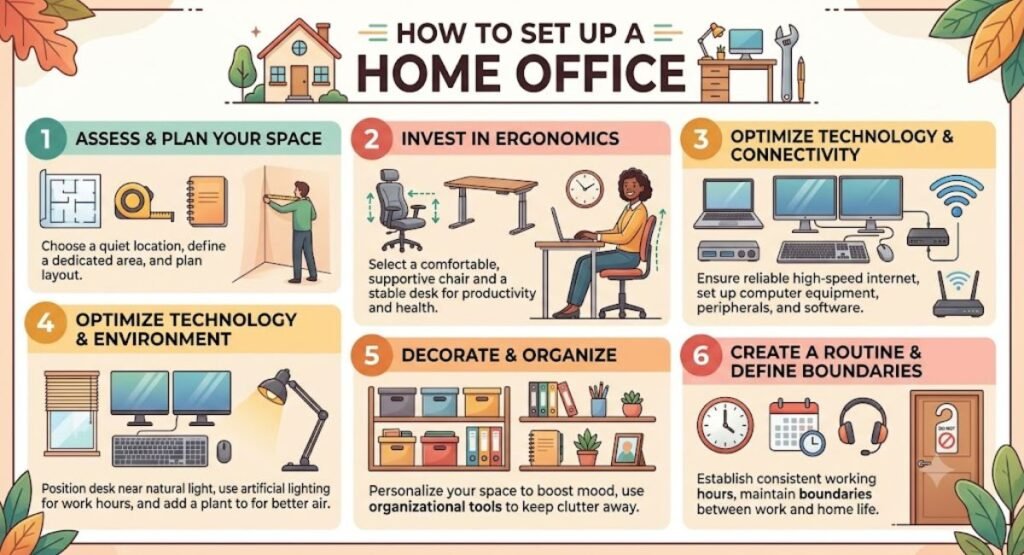
introduction
Working from home has become more common than ever, making a well-designed home office essential for productivity, comfort, and work-life balance. Whether you’re a remote employee, freelancer, entrepreneur, or student, setting up a dedicated workspace can significantly improve your focus and efficiency.
A thoughtfully designed home office goes beyond placing a desk and chair in a spare room. It should support your daily tasks, reduce distractions, promote good posture, and reflect your personal style. In this comprehensive guide, you’ll learn how to set up a home office that is both functional and inspiring.
Why a Dedicated Home Office Matters
A dedicated workspace helps separate professional responsibilities from personal life. It creates a routine, minimizes distractions, and allows you to concentrate on important tasks without interruptions.
Benefits of a well-planned home office include:
- Increased productivity
- Better organization
- Improved posture and comfort
- Enhanced video call appearance
- Reduced stress
- Better work-life balance
Even if you have limited space, creating a designated work area can make a significant difference.
Choose the Right Location
The first step in setting up a home office is selecting the best location.
Ideal options include:
- A spare bedroom
- An unused corner of the living room
- A finished basement
- An attic workspace
- A quiet nook under the stairs
- A converted guest room
If possible, choose an area away from high-traffic spaces to reduce noise and distractions.
Consider natural light.
Natural light boosts mood, reduces eye strain, and increases productivity.
Place your desk near a window without positioning your computer screen directly in front of or behind it to avoid glare. If natural light is limited, invest in quality LED lighting that mimics daylight.
Invest in an Ergonomic Chair
Since you’ll spend hours sitting, your chair is one of the most important investments.
Look for features such as the following:
- Adjustable height
- Lumbar support
- Adjustable armrests
- Breathable material
- Comfortable seat cushion
- Swivel base
A supportive chair helps prevent back pain and improves long-term comfort.
Select the Right Desk
Your desk should accommodate your work style and available space.
Popular desk options include:
- Standard office desk
- Standing desk
- Adjustable sit-stand desk
- L-shaped desk
- Corner desk
- Floating wall desk
Choose a desk large enough for your computer, documents, and essential accessories without creating clutter.
Organize Your Workspace
An organized workspace promotes efficiency and reduces distractions.
Keep your desk tidy by using:
- Drawer organizers
- File holders
- Desk trays
- Cable management boxes
- Storage baskets
- Floating shelves
Only keep frequently used items within easy reach.
Essential Home Office Equipment
Every productive home office should include the right tools.
| Essential Item | Purpose |
|---|---|
| Ergonomic chair | Supports proper posture |
| Desk | Primary work surface |
| Computer or laptop | Daily work tasks |
| External monitor | Improves productivity |
| Keyboard and mouse | Comfortable navigation |
| Desk lamp | Better lighting |
| High-speed internet | Reliable connectivity |
| Webcam | Professional video meetings |
| Headphones | Reduce distractions |
| Surge protector | Protects electronics |
Optimize Your Internet Connection
Reliable internet is essential for remote work.
Consider:
- High-speed broadband
- Mesh Wi-Fi systems
- Ethernet connection for maximum stability
- Wi-Fi extenders for larger homes
A stable connection prevents interruptions during meetings and large file transfers.
Create Good Lighting
Layered lighting creates a comfortable work environment.
Use a combination of:
- Natural light
- Overhead ceiling lighting
- Adjustable desk lamp
- Soft ambient lighting
Avoid harsh lighting that causes eye fatigue.
Improve Ergonomics
Proper ergonomics reduce strain during long work sessions.
Follow these guidelines:
- Screen at eye level
- Feet flat on the floor
- Elbows at approximately 90 degrees
- Wrists straight while typing
- Monitor about an arm’s length away
Small adjustments can greatly improve comfort.
Reduce Noise and Distractions
Noise can impact concentration.
Helpful solutions include:
- Noise-canceling headphones
- Area rugs
- Curtains
- Acoustic panels
- White noise machines
- Closing the office door during meetings
Creating a quiet environment improves focus.
Keep Cables Organized
Messy cables make a workspace look cluttered.
Use:
- Cable sleeves
- Cable clips
- Under-desk cable trays
- Velcro ties
- Wireless accessories when possible
A clean setup looks more professional and is easier to maintain.
Add Storage Solutions
Smart storage helps maximize available space.
Ideas include:
- Bookshelves
- Filing cabinets
- Floating shelves
- Storage ottomans
- Rolling carts
- Wall organizers
Vertical storage works especially well in smaller rooms.
Personalize Your Workspace
Your office should feel welcoming without becoming distracting.
Decor ideas include:
- Indoor plants
- Framed artwork
- Family photos
- Inspirational quotes
- Decorative lamps
- Neutral color palettes
- Minimalist accessories
A balanced design encourages creativity and motivation.
Maintain Good Air Quality
Fresh air contributes to better concentration.
Improve air quality by:
- Opening windows regularly
- Using an air purifier
- Adding air-purifying plants
- Keeping the room clean and dust-free
Comfortable temperatures also help maintain productivity.
Set Up for Video Calls
If you frequently attend virtual meetings:
- Position the camera at eye level.
- Use a clean, uncluttered background.
- Ensure your face is well-lit.
- Test your microphone regularly.
- Keep your workspace organized.
A professional setup leaves a positive impression.
Create a Daily Routine
Your workspace is only part of the equation.
Develop healthy habits by:
- Starting work at the same time each day
- Taking regular breaks
- Staying hydrated
- Stretching every hour
- Ending work at a consistent time
A routine helps maintain productivity while preventing burnout.
Common Home Office Mistakes to Avoid
Avoid these common errors:
- Using an uncomfortable dining chair
- Working from the couch every day
- Ignoring cable management
- Poor lighting
- Too much clutter
- Choosing style over comfort
- Skipping ergonomic adjustments
- Working without scheduled breaks
Budget-Friendly Home Office Tips
You don’t need a large budget to create an effective workspace.
Consider:
- Repurposing existing furniture
- Shopping secondhand
- Using floating shelves for storage
- DIY desk organizers
- Affordable LED desk lamps
- Simple décor with plants and artwork
Small improvements can make a big impact.
Frequently Asked Questions
Q: What is the ideal room for a home office?
A: A quiet room with natural light and minimal distractions is ideal. A spare bedroom or unused corner can also work well.
Q: How much space do I need for a home office?
A: Even a compact area measuring 4–6 feet wide can accommodate a functional desk, chair, and storage.
Q: What is the most important home office investment?
A: An ergonomic chair is often the best investment because it supports comfort and long-term health during extended work sessions.
Q: How can I make a small home office feel larger?
A: Use light colors, wall-mounted shelves, multifunctional furniture, and mirrors, and keep clutter to a minimum.
Q: Should I use a standing desk?
A: A sit-stand desk is an excellent option, allowing you to alternate between sitting and standing throughout the day, which may improve comfort and reduce fatigue.
Final Thoughts
A well-designed home office is an investment in your productivity, comfort, and overall well-being. By choosing the right location, investing in ergonomic furniture, organizing your workspace, and adding thoughtful personal touches, you can create an environment that supports focus and efficiency. Whether you have an entire room or just a small corner to work with, a carefully planned home office can help you stay motivated, organized, and ready to tackle your daily tasks from the comfort of home.